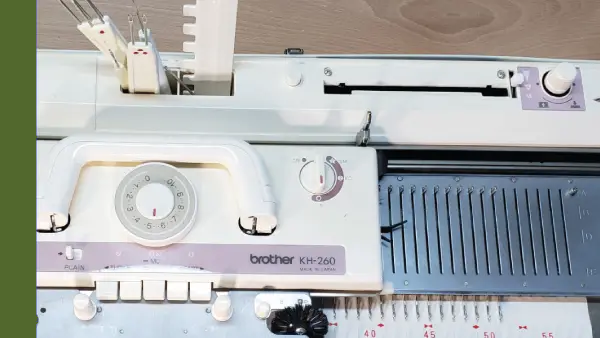
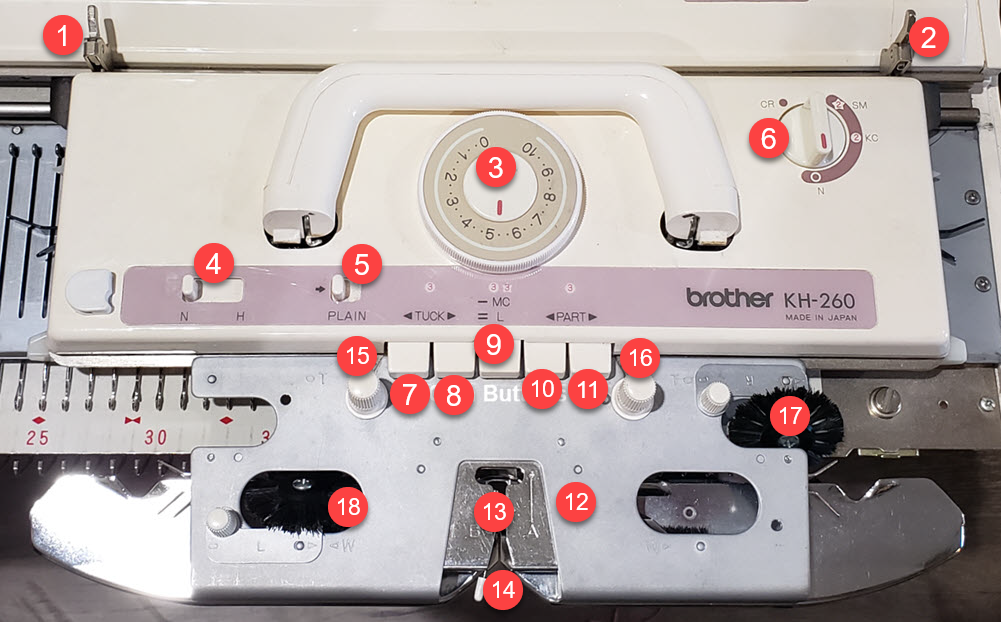
Take a moment to get familiar with the terminology and location of items on the carriage
Don't be overwhelmed by all the buttons, dials and levers on the carriage. As we cover the various techniques available, we will walk through each setting and explore it's impact on your knitting.
Instead of forming each stitch one-at-a-time like in hand knitting, the carriage acts as your hands and fingers.
- Using the butts of the needle and the channels underneath the carriage, select which needles will knit.
- The Tension dial controls how the yarn is fed and how large the stitches will be.
- The Change Knob Tells the machine that you want to knit in pattern
- The Cam buttons instruct the machine about what type of stitch pattern you want to create
As you continue on your journey to master your machine, all of the other settings will become second nature to you.
To create stitch patterns:
- Change Knob
- Cam Buttons
- Needle Positions (punchcard)
- Left Knit Leader Tripper
- Right Tripper (Knit Leader and Row Counter)
- Tension Dial
- Holding Cam Lever
- Cam Button Release Lever
- Change Knob
- Cam Button (Tuck Left)
- Cam Button (Tuck Right)
- Cam Button(s) (Fairisle and Thread Lace)
- Cam Button (Slip Left)
- Cam Button (Slip Right)
- Sinker Plate Assembly
- Yarn Feeder(s)
- Yarn Feeder Lever (Gate)
- Sinker Plate Knob
- Sinker Plate Knob
- Tuck Brush(es)
- Weaving Brush(es)