My pattern has a lot of pages. How can I print just the pages I want?
Prefer paper? You can choose exactly which pages to print.

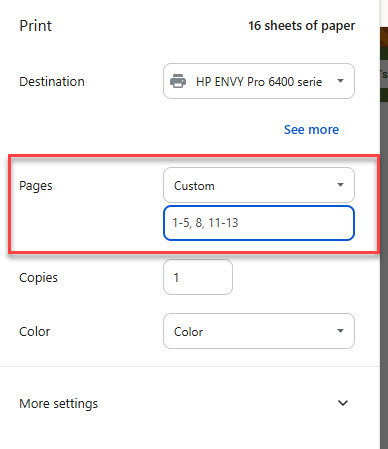
Open your saved pattern PDF and choose Print. In the Pages setting, select Custom or a page range, then enter only the pages you need.
Why This Works
Your personalized pattern includes detailed instructions, schematics, and shaping checklists to help you knit with confidence. You may want the complete pattern on your screen but only certain sections on paper. Selecting pages lets you print those sections and keep the full PDF for reference.
Try This
- Save your pattern as a PDF, then open that file.
- Look through the PDF and note which pages you want. Use the page numbers shown in the PDF viewer.
- Choose Print and find the Pages setting. Depending on your device, this may say Custom, Pages, or Page range.
- Enter your page selection:
- 5 prints just page 5.
- 2-6 prints pages 2 through 6.
- 2,7,17 prints only pages 2, 7, and 17.
- 2-6,17 prints pages 2 through 6, plus page 17.
- Check the print preview before printing. Include any continuation pages so you have the complete instructions or chart.